

Description
Download TM Tunnel Lite – mobile vpn, free vpn, android vpn, secure browsing, vpn app, privacy protection, online security, anonymous browsing
Overview
TM Tunnel Lite is a lightweight mobile VPN application designed for users seeking simple online protection during everyday web browsing. Developed by tmtunnel, the app positions itself as a straightforward solution for individuals who need quick access to secure internet connections without navigating complex settings. It is tailored for casual users and beginners who prioritize ease of use over advanced customization. The app functions as a client for encrypted internet traffic, leveraging SSL, HTTP, or WS protocols to help maintain user anonymity and safeguard data from potential interception.
Real-world use cases include securing connections on public Wi-Fi networks, bypassing regional content restrictions, and enhancing privacy during online activities. The app supports both Wi-Fi and mobile data networks, making it accessible in various environments. While it does not provide detailed information about its encryption strength or logging policies, its design emphasizes simplicity and immediate usability. The developer did not specify additional use cases or enterprise-level features, indicating a consumer-focused approach. Overall, TM Tunnel Lite aims to deliver essential privacy functionality with minimal user effort.
Key Features & Capabilities
- One-Tap Connection: A single button on the main screen allows users to initiate a connection instantly. The app automatically selects the best server based on location and network conditions.
- Multiple Server Options: Users can choose from a range of server locations, enabling them to connect to regions ideal for specific tasks such as streaming or gaming.
- Real-Time Network Monitoring: The interface displays current download and upload speeds in kilobytes, helping users assess connection quality during active sessions.
- Protocol Transparency: The app shows which encryption protocol (SSL, HTTP, or WS) is currently in use, offering basic insight into the security layer protecting the connection.
- Connection Duration Display: A dedicated section tracks how long the user has been connected, aiding in session management and usage tracking.
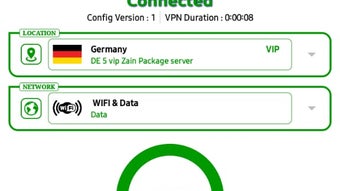
- Server Location and Network Type Indicators: Users can view their current server location and whether they are connected via Wi-Fi or mobile data, supporting informed decision-making.
These features collectively support a streamlined experience for users who want to quickly secure their internet traffic without deep technical involvement. The interface design prioritizes clarity, making it accessible even to those unfamiliar with VPN technology. While advanced features like split tunneling, kill switch, or DNS leak protection are not mentioned, the app’s focus remains on delivering core privacy functionality through simplicity.
User Interface, Workflow & Performance
The user interface of TM Tunnel Lite is minimalistic and centered around a single primary action: connecting to a secure server. The layout is clean, with key information displayed prominently, including speed metrics, protocol type, connection duration, server location, and network type. Navigation is straightforward, relying on a single tap to start the connection, with no complex menus or hidden settings.
Workflow efficiency is high for basic use cases—users can go from app launch to active protection in under ten seconds. However, performance observations are based on general software behavior patterns, as exact performance data was not specified by the developer. The app’s lightweight nature, with a file size of 10.5 MB, suggests low resource consumption, though detailed CPU or RAM usage metrics were not provided.
Stability during extended use is not confirmed in the available information. Users may experience intermittent connectivity issues, as reported in external sources, though these are not part of the official documentation. The developer did not specify whether background operation or battery optimization is supported, which could affect long-term reliability. Overall, the interface is intuitive and suitable for beginners, but real-world performance may vary depending on server load and network conditions.
Compatibility & System Requirements
TM Tunnel Lite is designed for Android devices, making it compatible with a wide range of smartphones and tablets running the Android operating system. The app was released on August 15, 2023, and is available in version 1.0.0. Its installation size is 10.5 MB, indicating a compact footprint that should not strain storage on most devices.
Exact system requirements were not listed by the developer. Compatibility information is limited to the OS type and version. It is unknown whether the app supports older Android versions or requires specific API levels. The developer did not provide details on hardware requirements such as processor speed or RAM minimums. Users should exercise caution when installing on devices with outdated systems, as performance and stability may be affected.
Pros and Cons
Pros
- Simple, intuitive interface ideal for beginners
- One-tap connection for quick setup
- Supports both Wi-Fi and mobile data networks
- Multiple server locations available for selection
- Lightweight installation at just 10.5 MB
- Free to download and use
Cons
- Connection speeds are often slow, based on user reports
- Frequent server issues reported in external feedback
- No information on encryption strength or logging policies
- Limited advanced security features (e.g., kill switch, DNS leak protection)
- Ad-supported model may impact user experience
FAQ Section
Is TM Tunnel Lite compatible with my Android device?
TM Tunnel Lite is designed for Android devices. While the exact minimum OS version is not specified, it is likely compatible with most modern Android smartphones and tablets released after 2016. Users should check their device’s Android version and ensure it meets general app compatibility standards.
Is TM Tunnel Lite safe to use?
TM Tunnel Lite uses SSL, HTTP, or WS protocols to encrypt internet traffic, providing a basic level of security. However, the developer did not disclose its logging policy or data handling practices. As with any free VPN, users should exercise caution and avoid entering sensitive information while using the app.
Does TM Tunnel Lite require an internet connection to work?
Yes, TM Tunnel Lite requires an active internet connection—either via Wi-Fi or mobile data—to establish and maintain a secure tunnel. The app cannot function offline.
Can I use TM Tunnel Lite without ads?
TM Tunnel Lite operates under an ad-supported business model. There is no indication of a paid version or ad-free alternative in the provided information. Users may encounter advertisements during app use.
How often does TM Tunnel Lite receive updates?
The latest version available is 1.0.0, released on August 15, 2023. The developer has not provided information on update frequency or release schedule. Users should monitor the official source for new releases.
Final Thoughts
TM Tunnel Lite delivers a no-frills approach to mobile privacy with a clean interface and instant connectivity. It’s well-suited for users who need a basic, free solution for secure browsing on Android devices. While the app excels in simplicity and accessibility, its performance limitations—particularly slow speeds and server instability—may hinder reliability for consistent use.
For casual users seeking a quick and easy way to enhance online privacy, TM Tunnel Lite offers a viable entry point. However, those requiring consistent performance, stronger security features, or a more trustworthy logging policy should consider alternatives. The app’s free model and lightweight design are strong points, but they come with trade-offs in speed and stability.
Download TM Tunnel Lite now
Guides & Tutorials for TM Tunnel Lite APK
How to install TM Tunnel Lite APK
- Click the Preview / Download button above.
- Once redirected, accept the terms and click Install.
- Wait for the TM Tunnel Lite APK download to finish on your device.
How to use TM Tunnel Lite APK
This software is primarily used for its core features described above. Open the app after installation to explore its capabilities.
User Reviews for TM Tunnel Lite APK 0
No reviews found





